myPatientVisit Portal
- 4.8
- Rating
- 10.00K
- Installs
- Free
- Price

 Analysis by App-foxy
When a medical visit is already scheduled, the hardest part is often not the appointment itself. It is keeping the details organized while several people in a household may need to know what is happening. myPatientVisit Portal is built for patients who use the myPatientVisit service and want a mobile-ready way to stay connected with their care. I found it most useful as a companion to an existing patient relationship, rather than as a general health app that tries to manage every part of daily wellness.
That distinction matters. This is a medical app from Nextech Systems, LLC, and its value depends on whether your healthcare provider uses the myPatientVisit system. If that connection is in place, the app can be a more convenient alternative to relying entirely on a browser, paper reminders, or messages passed between family members. If you are looking for symptom tracking, exercise planning, medication coaching, or an independent health record, this is not the right kind of tool.
How it fits into a shared household routine
I can easily imagine using it on a shared household device after a parent, partner, or older relative receives a message about an upcoming medical visit. One person may handle the practical side of care, while another person actually attends the appointment. A mobile portal gives the household a central place to begin that coordination, instead of forcing everyone to search through email or remember which browser page was used last time.
You May Also Like

 AccuWeather: Weather Radar
AccuWeather Review: A Quick, Clear Forecast for Everyday Decisions
For everyday plans, the best forecast is the one you can understand quickly. AccuWeather makes rain timing, radar, and local conditions easy to act on, with a few trade-offs.

 Hill Climb Racing
Why Hill Climb Racing Still Turns Crashes Into One More Run
A tiny car, a bumpy hill and one more upgrade: Hill Climb Racing keeps resurfacing because its simple chaos makes every near-miss feel personal.

 AliExpress - Shopping App
AliExpress Makes Global Shopping Feel Personal, but Shoppers Bear the Risk
AliExpress turns a global marketplace into a pocket-sized discovery engine. Its reach is useful, its shopping loop compelling, and its trade-offs easy to miss.

 Lords Mobile: Kingdom Wars
Lords Mobile Is a Kingdom-Building Routine, Not a Quick Match
A case-by-case verdict on the building, battles, device demands, and social commitments that make Lords Mobile rewarding for some players and exhausting for others.

 PDF Scanner app - TapScanner
TapScanner Makes Paperwork Easier to Capture, Check, and Share
TapScanner makes scanning with a phone feel less like a rescue operation and more like a dependable step in getting work done. Its capture tools are useful, though not flawless.

 Block Blast!
 Shows How Much a Puzzle Game Can Leave Out
A quiet grid game shows why puzzle players increasingly value instant clarity, repeatable skill and low-pressure play—and where the genre still needs to catch up.
More From Our News Desk
View All News


The useful scenario is not complicated. A family member notices that an appointment needs attention, opens the portal, and checks the relevant patient account before discussing the next step. Another person can then help with transport, timing, or preparation. The app does not replace the conversation, but it can reduce the number of small details that get lost between people.
That shared-device scenario also exposes an important boundary: a household is not automatically one patient account. I would not treat the app as a communal medical notebook where everyone signs in under the same identity. Health information belongs to the individual patient, so the safer habit is to keep account access tied to the correct person and avoid leaving a session open for the next user.
This is especially important when a tablet or phone is used by several people. Before handing the device to somebody else, I would sign out if the app offers that option and use the phone’s own screen lock. I would also avoid reading private medical details aloud in a busy room simply because the device is nearby. The app can support household coordination, but it does not remove the need for ordinary privacy awareness.
What I would check before installing
The first practical question is whether your clinic or provider uses myPatientVisit. The app’s purpose is connected to that service, so installation alone does not guarantee that it will be useful for every healthcare relationship. I would confirm the portal name with the provider before spending time troubleshooting an account that may belong to a different system.
Compatibility is another early checkpoint. The current version is 6.130.0 and requires iOS or Android 10 or later. That is not a demanding requirement for many recent phones, but it can matter if a family keeps an older device for occasional use. A shared tablet that cannot meet the operating-system requirement may prevent the very convenience the household expected.
The app is free, which makes trying it less of a financial decision than a compatibility and access decision. I still would not install it on every device in the home automatically. One trusted, supported device may be enough, particularly when only one person manages appointments. Fewer devices can mean fewer forgotten sessions and fewer opportunities for the wrong person to open a patient account.
Setup should be approached as an account task, not as a casual app download. I would keep the patient’s identifying information available, use the exact details requested by the provider’s portal, and avoid guessing if a sign-in step does not work. The quickest solution is usually to check the provider’s instructions or contact the office, rather than repeatedly trying variations that could create confusion.
For a household, I would decide in advance who is responsible for the first sign-in and who is merely helping with navigation. Those roles are different. A relative might be comfortable opening the app and reading an appointment time, while the patient should remain the person whose account is being accessed. That simple distinction helps prevent convenience from becoming accidental account sharing.
Keeping patient identities separate
Medical portals become awkward when several people need help, and this is where I would be particularly careful. A parent helping an adult child, a partner assisting with appointments, or a relative supporting an older patient may all use the same phone. That does not mean the app should be treated like a family calendar with interchangeable profiles.
I would start each session by checking whose information is visible before taking any action. On a shared device, that small pause is valuable. It can prevent a reminder intended for one patient from being mistaken for another person’s appointment, especially when several family members use the same clinic.
I would also avoid saving login details in a way that makes the account immediately available to every person who picks up the phone. The convenience is tempting, but medical information deserves a higher standard than a shared shopping account. If a caregiver needs regular access, the household should follow the provider’s approved process rather than inventing its own permanent workaround.
This is one of the app’s practical trade-offs. A mobile portal is faster than searching for a paper letter, but speed can encourage careless habits. I see the best experience as one where the patient remains in control and a helper provides support only when needed. That approach works well for occasional assistance without turning the entire household into one blurred account.
Using it for appointment coordination
The strongest household use is coordination around a specific patient visit. I would use the app as the starting point for checking what needs attention, then move the agreed details into the household’s normal planning method. That might be a shared calendar, a conversation, or a written note kept by the person responsible for transport. The portal should be treated as the medical source for the patient’s information, not necessarily as the only place where the family organizes its day.
A useful routine is to check the portal when an appointment is first discussed, again while arranging practical help, and once more before leaving. Those checks serve different purposes. The first confirms what the visit involves, the second helps the household coordinate, and the last reduces the chance that someone relies on an old message or memory.
I would be careful about forwarding screenshots or copying medical details into a group chat. That may seem efficient when several relatives are involved, but it spreads sensitive information beyond the original account. A better approach is to share only the minimum practical detail needed, such as when a person needs a ride, while directing the patient to the portal for private information.
When an appointment affects work, school, or caregiving, the app can help the household begin planning earlier. The benefit is less about the phone itself and more about reducing uncertainty. If one person is responsible for the visit, that person can check the account directly instead of depending on a chain of messages that may become outdated.
There is also a limit to this workflow. I would not assume that opening the app means every urgent question has been answered. A portal is not a substitute for contacting the provider when a situation is time-sensitive or unclear. For immediate medical concerns, ordinary medical advice and emergency services remain more appropriate than waiting for a mobile account to resolve the issue.
Age, trust, and assisted use
The Everyone content rating makes the app broadly suitable from an age-classification perspective, but that does not mean every child should manage a patient account independently. Medical information involves maturity, privacy, and the patient’s own wishes. For a younger person, I would treat the app as something a parent or guardian helps with, not as a reason to hand over unrestricted access.
Older adults may benefit from the mobile format if they already use a smartphone comfortably. The main advantage is having the portal available without needing to remember a particular web address. Still, I would not assume that every older user will find an app easier than a browser or a phone call. Some people prefer a larger screen, printed instructions, or direct help from the clinic.
Trust is central in caregiver situations. If I were helping a relative, I would explain what I was doing before opening the account and ask the patient to remain involved whenever possible. The app can make assistance smoother, but it should not quietly turn a helper into the person making decisions or interpreting medical information.
For a teenager or young adult sharing a family phone, I would be especially mindful of notifications and visible account content. A medical reminder appearing on a lock screen or being seen by another household member can reveal more than intended. I would review the phone’s notification behavior and choose a device arrangement that respects the patient’s privacy, without assuming that the app itself provides family controls.
Where it compares well with ordinary alternatives
Compared with paper reminders, myPatientVisit is easier to carry and less likely to be left in a drawer. Compared with relying on one family member’s memory, it gives the patient a more direct connection to the provider’s portal. Compared with opening a browser every time, a dedicated app can feel more natural on a phone, particularly for someone who checks appointments while away from home.
The comparison with a general calendar is more nuanced. A calendar is better for household logistics: assigning a driver, blocking out work time, or reminding someone to bring documents. The medical portal is better for patient-specific information connected to the provider. I would use both rather than forcing one tool to do the other’s job.
A general health app is also a different proposition. Such apps may focus on habits, exercise, symptoms, or long-term tracking, while this one is centered on the patient-portal relationship. That narrower focus is a strength when you need access to care-related information, but a limitation if you want a complete personal health dashboard.
The browser version may still be preferable for someone who works mainly on a computer, needs a larger display, or dislikes installing medical apps on a phone. I would choose the mobile version for quick access and portability, not because it automatically replaces every other way of interacting with a provider.
What the adoption numbers suggest, and what they do not
The app has an average rating of 4.1 from 111 ratings and 27 written reviews. That gives a prospective user some evidence that it works well for a portion of its audience, but it is not a large enough review pool for me to treat the score as a universal verdict. Medical portals are particularly dependent on the provider’s setup, patient account, and individual expectations.
It has passed 10K installs, which shows that it is being used beyond a tiny test group. I would read that as a sign of practical reach rather than proof that every clinic or household will have the same experience. The developer’s role and the provider connection remain more important than the install figure when deciding whether it belongs on your device.
The app was released on Apr 29, 2020, and its continuing version information shows that it has not simply remained frozen at its original launch. Even so, I would judge it by the task I need completed: can the intended patient access the right portal, on the right device, without creating confusion for the rest of the household?
Small habits that make the experience safer
I would create a simple household rule: one patient, one account context, and one person responsible for checking details before they are shared. That rule is more useful than installing the app on multiple phones without a plan. It keeps coordination practical while respecting the fact that medical information is personal.
Another useful habit is to separate medical facts from logistics. The patient can use the portal for the care-related information, while the family calendar records only what is needed to arrange transport or time away from work. This reduces unnecessary copying of sensitive details and makes the shared schedule easier for everyone to understand.
If a relative needs help, I would let that person navigate while the patient remains present, when possible. This creates a natural opportunity to confirm that the correct account is open and that everyone understands what is being discussed. It also avoids making the helper the unofficial owner of the patient’s medical access.
Finally, I would treat the app as a tool for planned care, not a constant source of reassurance. Repeatedly checking a portal will not necessarily clarify symptoms or replace professional guidance. Its best role is concrete: helping the right patient and the right household members stay oriented around care that is already connected to the provider.
My household verdict
I recommend myPatientVisit Portal for patients whose provider uses the myPatientVisit service and who want a convenient mobile route into that relationship. It is particularly sensible for a household where one person occasionally helps another coordinate appointments, as long as everyone respects account boundaries and privacy.
I would skip it if you need a broad wellness tracker, a shared family medical database, or a tool designed to manage several people under one casual household login. I would also choose a browser or direct contact with the provider when a larger screen, personal assistance, or urgent clarification matters more than mobile convenience.
For the right patient, the free price and Everyone rating make it approachable, and the current 6.130.0 release supports its role as an actively usable portal companion. My honest view is that its success depends less on flashy features than on disciplined use: install it on a supported device, confirm the correct patient account, coordinate only what the household needs, and keep private medical details private.
That makes the app a practical addition rather than a complete healthcare solution. I would keep it available for the family member who manages appointments, but I would not treat a shared phone as shared ownership of anyone’s medical information. Used with that boundary in mind, it can make everyday coordination calmer without pretending to replace the provider, the patient, or the conversations that care still requires.
FAQs for myPatientVisit Portal
01What is myPatientVisit Portal and what can I do with it?
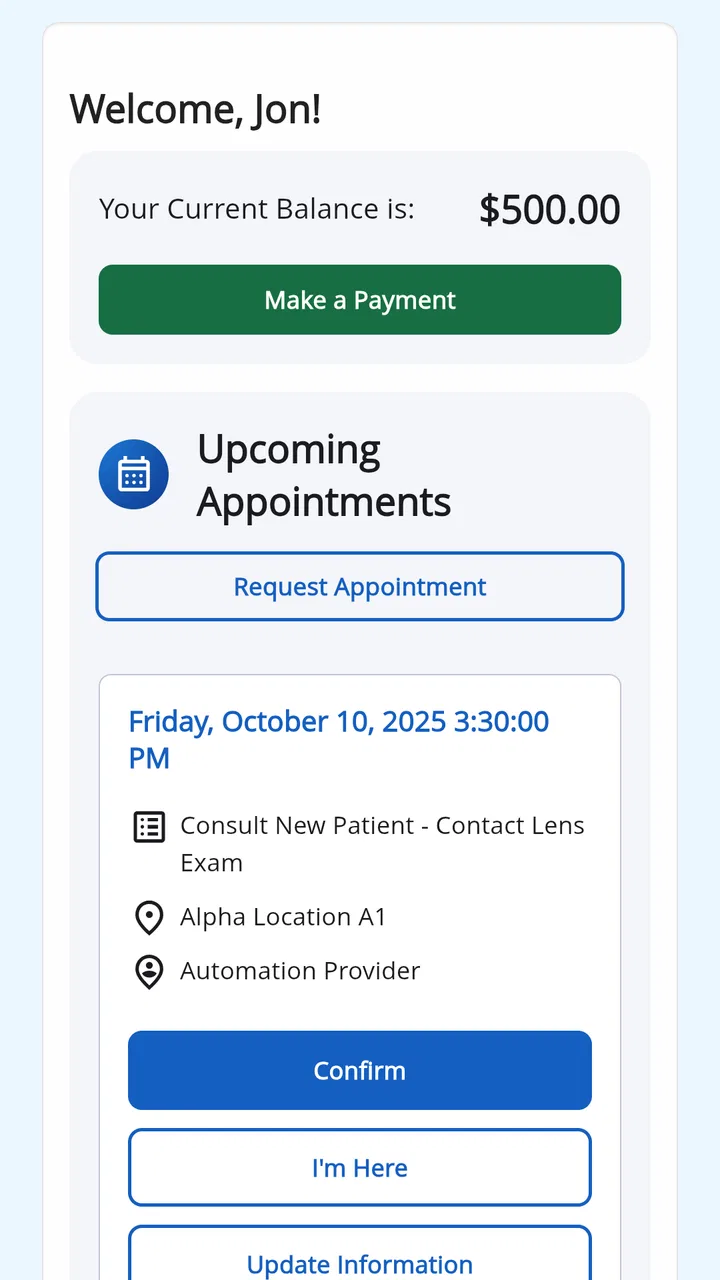
myPatientVisit Portal is a user-friendly application designed to streamline patient interaction with healthcare providers. Patients can schedule appointments, view medical records, communicate with their healthcare team, and manage their health information all in one place. It serves as a convenient tool for enhancing patient engagement and ensuring timely access to personal health data.
02Is myPatientVisit Portal secure and how is my personal information protected?
Yes, myPatientVisit Portal is secure. It uses advanced encryption technology to protect your data. The application complies with HIPAA regulations, ensuring that your personal and medical information is safeguarded. Users can confidently use the portal knowing that their privacy and security are prioritized.
03How do I set up and access my account on myPatientVisit Portal?
To set up an account on myPatientVisit Portal, you need to receive an invitation from your healthcare provider. Follow the link in the email to create your account by entering the required information. Once registered, you can access your account via the app or website using your login credentials anytime, anywhere.
04What devices and operating systems is myPatientVisit Portal compatible with?
myPatientVisit Portal is compatible with both Android and iOS devices. The app is designed to work seamlessly on smartphones and tablets running the latest versions of these operating systems. This ensures that all users, regardless of their device preference, can access their health information conveniently.
05What should I do if I encounter issues or need help with myPatientVisit Portal?
If you encounter any issues while using myPatientVisit Portal, you can access the app’s help section for troubleshooting tips. Additionally, your healthcare provider’s support team is available to assist with any technical difficulties. You can contact them directly through the app or via the provided customer service contact details.
Pros
- User-friendly interface for easy navigation.
- Personalized dashboard for quick access.
- Secure login with two-step verification.
- Real-time updates on appointments and tests.
- Comprehensive health records management.
Cons
- Limited offline functionality.
- Occasional sync delays with providers.
- Push notifications can be inconsistent.
- Requires stable internet connection.
- No direct chat with healthcare providers.

myPatientVisit Portal
Gallery